Reverse-engineering a £3.50 Tesco Bluetooth tracker
27 August 2026 · 9 min read
I bought a Bluetooth tracker from Tesco for £3.50. It’s sold as a tracker, but it isn’t actually a GPS tracker. Instead, it’s a small Bluetooth Low Energy (BLE) tag called iTAG which connects to an app called iSearching.
Since I don’t have much use for it as a tracker, I decided to find out how it works.
Try it yourself
I also made a small Web Bluetooth tool that connects directly to an iTAG. It can detect button presses and control the tracker’s alarm. Make sure you’re using a compatible browser, such as Chrome or Edge.
Open the iTAG Web Bluetooth tool →
Contents
The iSearching app
The recommended app, iSearching, provides a camera remote, last-connected location history, disconnection alarms, voice recording and a button to make the iTAG ring.
- iSearching on the Apple App Store: iSearching App - App Store
- iSearching on the Google Play Store: iSearching - Apps on Google Play
The tag itself doesn’t contain GPS, a microphone or a camera. Most of those features are implemented by the phone.
BLE advertising
I used LightBlue on my Mac to inspect the device.
| Property | Value |
|---|---|
| Local Name | iTAG |
| Connectable | Yes |
| Service UUIDs | FFE0 |
| Manufacturer ID | 0x0105 |
| Manufacturer Data | 4F0F025453486602010300 |
That manufacturer data becomes important later.
GATT services
These are the useful characteristics I’ve identified:
| Service | Characteristic | Properties | Purpose |
|---|---|---|---|
180F |
2A19 |
Read, Notify | Battery level |
1804 |
2A07 |
Read | Transmit power |
1803 |
2A06 |
Read, Write | Bluetooth link-loss alert |
1802 |
2A06 |
Write | Immediately sound alarm |
FFE0 |
FFE1 |
Read, Notify | Physical button events |
FFE0 |
FFE3 |
Read | Device information |
Writing 00 to 1802/2A06 stops the buzzer, while 01 or 02 starts it.
The Link Loss characteristic at 1803/2A06 accepts the same values. Curiously, it initially reads:
3C
That’s not a valid standard Alert Level. Writing 00, 01 or 02 makes subsequent reads return that value until the iTAG is restarted, when it returns to 3C.
The physical button is simpler. Subscribing to notifications from FFE1 produces:
01
when the button is pressed. Holding the button powers the iTAG off.
FFE3 contains:
4F0F02545348
which is exactly the first six bytes of the advertised manufacturer data:
4F0F025453486602010300
Its final three bytes are ASCII TSH, although I don’t yet know what that means.
There are also several unidentified proprietary characteristics:
FFE0
├── FFE1
├── FFE2
├── FFE3
├── FFE4
├── FFE5
├── FFE6
└── FFE7

FF01
├── FF02
└── FF03

AE00
├── AE01
└── AE02
Rather than blindly writing arbitrary data to them, I decided to find out what the official app does.
Taking it apart
Naturally, I also opened the tracker.
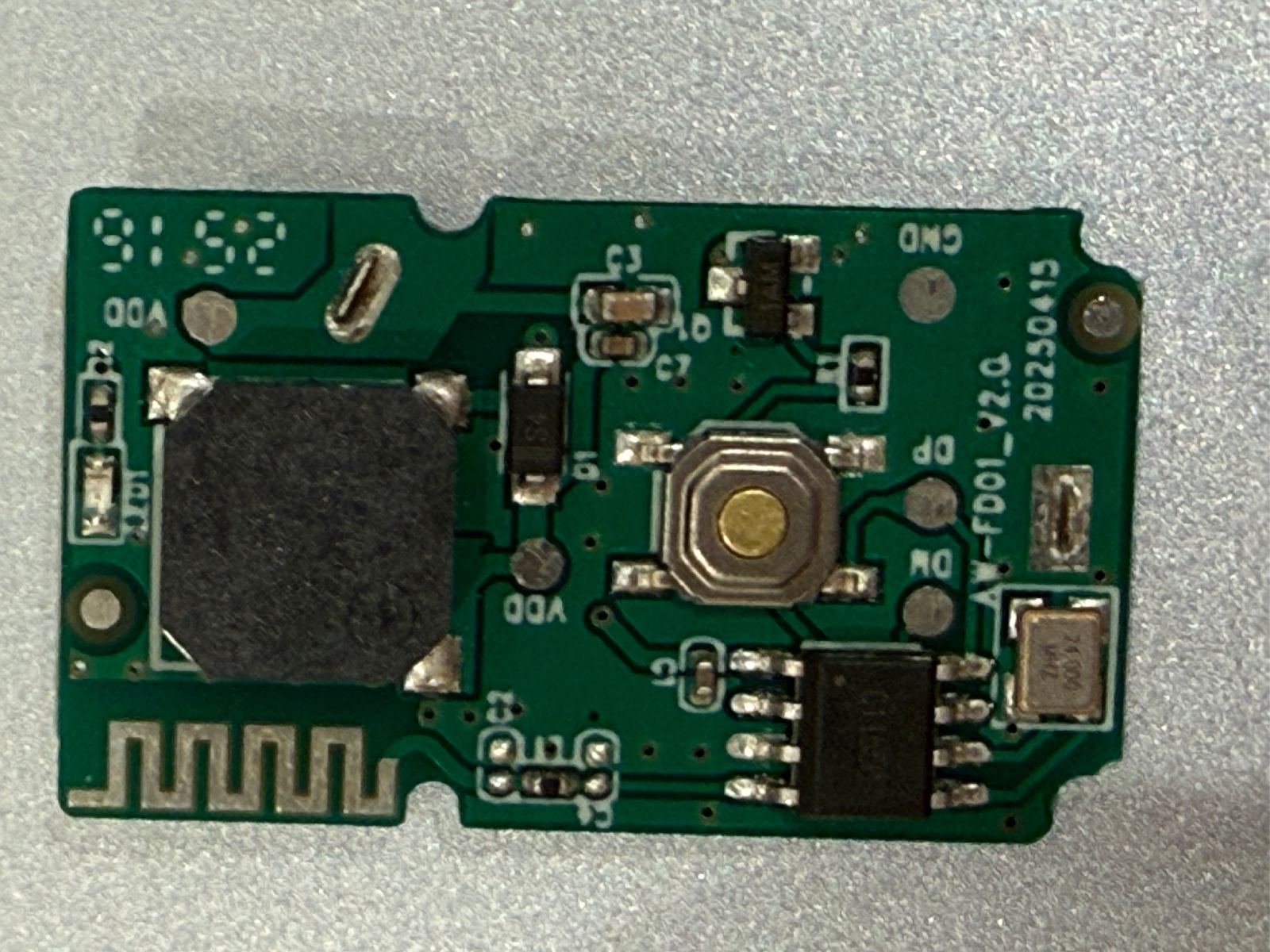
The PCB is extremely simple. Unfortunately, the main Bluetooth controller uses chip-on-board construction: the silicon is hidden beneath black epoxy, leaving no conventional chip marking to identify.
There are test pads labelled DP, DM, VDD and GND. I don’t yet know whether DP and DM are USB, a programming interface or something else.
I don’t currently have the hardware needed to probe them or attempt a firmware dump, so I took another route: decompiling iSearching.
Decompiling iSearching
The Android app can be opened in JADX, allowing its BLE implementation to be searched for the UUIDs exposed by the tracker.
Starting with an older version
I started with iSearching 1.3.2. Searching for FFE0 quickly found:
public static String c = "0000ffe0-0000-1000-8000-00805f9b34fb";
public static String d = "0000ffe1-0000-1000-8000-00805f9b34fb";
public static String e = "00001802-0000-1000-8000-00805f9b34fb";
public static String f = "00001803-0000-1000-8000-00805f9b34fb";
public static String g = "00002a06-0000-1000-8000-00805f9b34fb";
The app enables notifications on FFE1, and its notification handler recognises two values:
01
A1
For 01, it waits 500 ms for another event to distinguish a single click from a double click. In camera mode, it takes a photo immediately.
The old app also writes 00, 01 or 02 directly to 1802/2A06 to control the alarm, matching my experiments.
Useful confirmation, but it didn’t explain the unidentified proprietary characteristics.
The current version did.
Multiple generations of iTAG
The current iSearching BLE implementation lives under:
com.zoqin.iSearchingPro.ble
Its BleCodeToDataUtil class contains:
public static final int DEVICE_TYPE_ITAG = 1;
public static final int DEVICE_TYPE_MYTAG = 2;
public static final int DEVICE_TYPE_OLD_ITAG = 0;
So iSearching doesn’t have one universal iTAG protocol. It supports multiple generations.
The old-iTAG profile maps its operations to these characteristics:
| Purpose | Service | Characteristic |
|---|---|---|
| Notifications | FFE0 |
FFE1 |
| Alarm commands | 1802 |
2A06 |
| Configuration | FFE0 |
FFE2 |
That finally gives FFE2 a purpose.
The application’s protocol table contains:
public static final String[] BLE_SEND_DISCONNECT_ALARM = {
    "555501",
    "5A510301",
    "01"
};

public static final String[] BLE_SEND_DISCONNECT_NOT_ALARM = {
    "555500",
    "5A510300",
    "00"
};
The old-iTAG profile selects index 2:
FFE0 / FFE2

01 = enable disconnection alarm
00 = disable disconnection alarm
This also explains something odd from my earlier experiments.
Although the tracker exposes the standard Link Loss characteristic at 1803/2A06, current iSearching doesn’t use it to configure the old iTAG’s disconnection alarm. It writes to FFE2 instead.
So the mysterious initial 3C value in 1803/2A06 appears to be a separate firmware quirk.
A newer protocol
DEVICE_TYPE_ITAG and DEVICE_TYPE_MYTAG use a newer protocol. FFE1 becomes the command/configuration characteristic and FFE2 becomes the notification characteristic.
Most packets begin with 5A 51:
| Direction | Packet | Meaning |
|---|---|---|
| Phone → tracker | 5A 51 02 01 |
Start/check alarm |
| Phone → tracker | 5A 51 02 00 |
Cancel alarm |
| Phone → tracker | 5A 51 03 01 |
Disconnect alarm on |
| Phone → tracker | 5A 51 03 00 |
Disconnect alarm off |
| Phone → tracker | 5A 51 01 |
Request battery |
| Tracker → phone | 5A 51 04 01 |
Button/check event |
| Tracker → phone | 5A 51 04 02 |
Double-click event |
| Tracker → phone | 5A 51 04 03 |
Automatic alarm stop |
| Tracker → phone | 5A 51 01 ... |
Battery response |
The generic protocol class also contains commands for a Hall alarm and connection verification, but neither iTAG profile actually assigns those fields. Their presence isn’t evidence that the Tesco tracker supports them.
Which protocol does my iTAG use?
This was the interesting part.
During BLE scanning, iSearching extracts the Manufacturer Specific Data (0xFF) from each advertisement and passes it to a method wonderfully named:
Warehousing()
For devices named iTAG, it performs this check:
i = (
    bArr.length != 0 &&
    (bArr[4] ^ 18) == bArr[9] &&
    (bArr[5] ^ 18) == bArr[10]
) ? 1 : 0;
18 decimal is 0x12, so:
manufacturer[9]  == manufacturer[4] XOR 0x12
manufacturer[10] == manufacturer[5] XOR 0x12
If both comparisons succeed, the tracker is type 1, using the newer protocol. Otherwise it’s type 0, DEVICE_TYPE_OLD_ITAG.
Remember the Tesco tracker’s manufacturer data?
4F 0F 02 54 53 48 66 02 01 03 00
The relevant bytes are:
manufacturer[4]  = 53
manufacturer[5]  = 48
manufacturer[9]  = 03
manufacturer[10] = 00
Now apply the XOR:
53 XOR 12 = 41
48 XOR 12 = 5A
Neither matches:
41 != 03
5A != 00
So current iSearching identifies the £3.50 Tesco tracker as:
DEVICE_TYPE_OLD_ITAG = 0
The Tesco iTAG protocol
We can now reconstruct the part of the protocol that current iSearching actually uses:
FFE0 / FFE1
  Notify
  01 = button/check event

FFE0 / FFE2
  Write
  00 = disconnection alarm disabled
  01 = disconnection alarm enabled

1802 / 2A06
  Write
  00 = stop alarm
  02 = start/check alarm
The physical tracker exposes considerably more than this, including Battery, Tx Power, Link Loss, FFE3 through FFE7, FF01 and AE00.
That’s an important distinction: decompiling iSearching tells us what iSearching uses, not necessarily everything the firmware can do.
Still, several independent pieces of evidence now agree. The alarm commands from the APK work on the physical tracker. FFE1 matches its button events. FFE2, previously unidentified, controls iSearching’s disconnection-alarm setting. And the advertising data captured over the air goes through the exact classification algorithm that selects this protocol.
At this point, the protocol isn’t much of a black box anymore.
Which raises a more entertaining possibility.
Instead of writing software that talks to an iTAG, there is now enough information to write software that pretends to be one.
An emulator would only need to reproduce the advertising data and the small GATT server expected by iSearching. Incoming writes could be logged instead of activating a buzzer, while a virtual button could send the same FFE1 notification as the physical tracker.
If iSearching connects to it and behaves as though it were the £3.50 Tesco tracker, that would be a rather nice final test of the protocol recovered from the app.
That’s probably what I’m going to try next.
And, somehow, after all of this, the real tracker still works.