I reverse engineered KineMaster’s project format
20 September 2026 · 7 min read
KineMaster is a mobile video editor, and it can export a project as a .kine file. I wanted to build projects outside the app, so I set about working out what is inside one.
Important
This is unofficial documentation of the.kinefile format based on files exported by KineMaster 8.1.17.2420 on iOS. It is not affiliated with or endorsed by KineMaster. The format may change in future versions. This is about interoperability, not about unlocking anything paid.
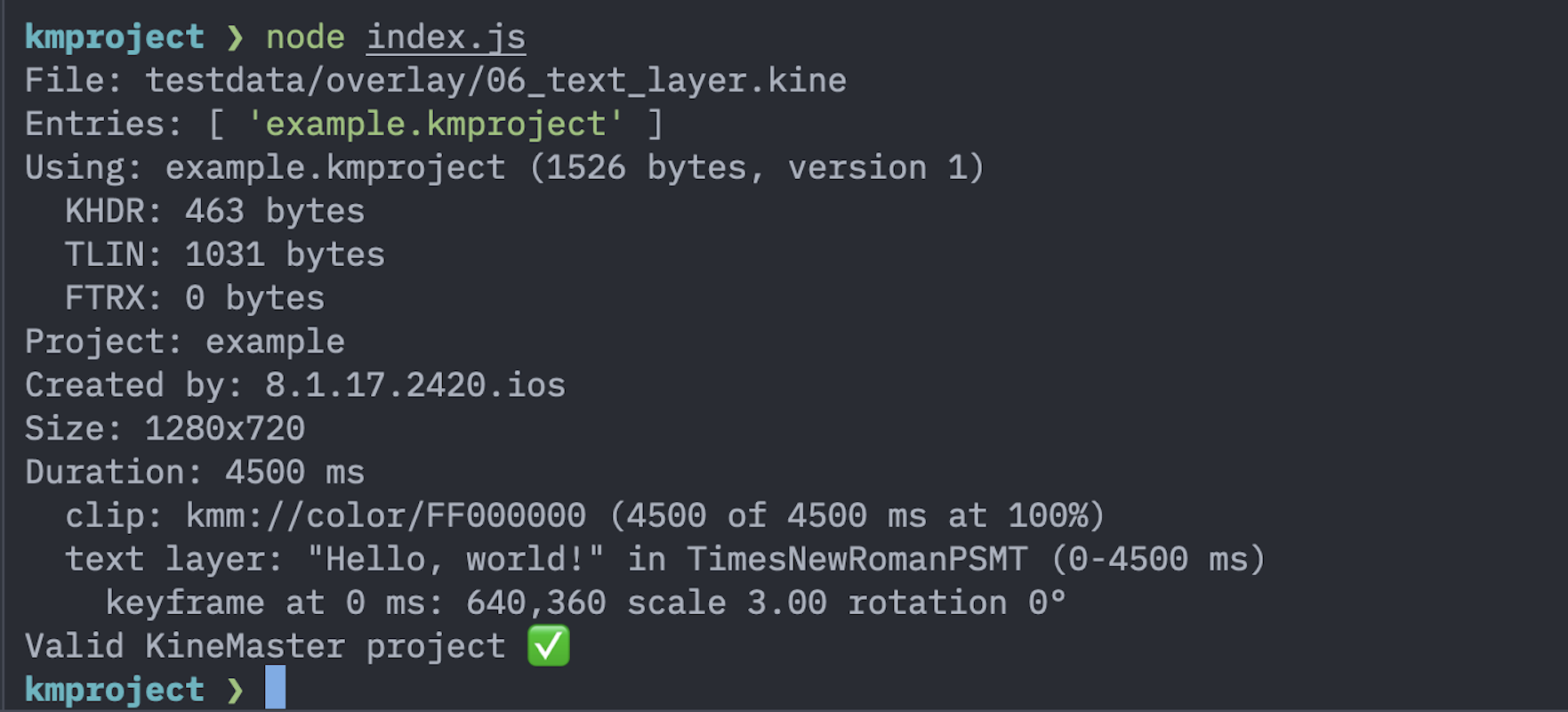
Opening the file
unzip -l was enough to get started. A .kine is a ZIP, holding a .kmproject file named after the project, plus a contents/ folder with any imported media.
The media handling is inconsistent in a way that matters later. Video and audio are copied in byte for byte, but renamed to a numeric id such as 1000.mov. Images are re-encoded as JPEG, and may keep their original name or be given a UUID depending on where they were imported from. Solid colours are not stored as files at all. So the file names can’t be trusted, and anything reading these files should resolve media through the reference in the project rather than by looking at contents/.
The .kmproject container
The .kmproject opens with f3 4b 4d ea, which shows up as .KM. in a hex dump. It isn’t a single blob; it’s a small chunked container:
f3 4b 4d ea               magic
00 00 00 01               version, big-endian uint32
repeated chunk:
  4-byte tag              "KHDR" -> project header
                          "TLIN" -> timeline
                          "FTRX" -> end marker, always length 0
  big-endian uint32       payload length
  payload                 (no checksum)
The tags appear to be abbreviations: header, timeline, and presumably a footer. The chunk lengths chain exactly to the end of the file, which makes a nice integrity check, and there is no checksum anywhere.
The payloads inside KHDR and TLIN turned out to be Protocol Buffers. There’s no schema shipped with the file, of course, so protoc --decode_raw gives you field numbers and values but no names:
2: 2420
8: 4500
101: "com.nexstreaming.kinemaster.basic"
109: "example"
That is enough to start guessing. Field 8 was 4500 in a project that was 4.5 seconds long, 109 was the project name, and 101 was clearly the app id.
Seventeen samples
Guessing field by field from one file gets you nowhere, so I made 17 sample projects, each changing exactly one thing from a baseline: a black screen with nothing else. One sample trimmed a video. One added a crossfade. One rotated some text by 37 degrees. One changed the font.
Then it’s just diffing. The trimmed video sample changed exactly two fields, 128 and 129, to 1913 and 1180. The source video was 5000 ms, and the header duration in that sample was 1907. 5000 − 1913 − 1180 = 1907, so 128 and 129 are the trims taken off the start and end, and the played length is what remains. No guesswork needed.
The crossfade sample was similar. A 5000 ms clip and a 4500 ms clip, with a 1500 ms crossfade between them, gave a project 8000 ms long: 5000 + 4500 − 1500. So transitions overlap their neighbours rather than sitting between them, which also explains why clips don’t store a start time anywhere. Each clip’s position falls out of the durations and overlaps before it.
Setting speed to 2x changed one field from 100 to 200 and halved the header duration. Volume at 37% changed one field to 37. Those are percentages, which is unremarkable but worth knowing.
The timeline
The timeline chunk has two lists. One is the primary track, in playback order, alternating clip, transition, clip, transition — every clip gets a transition slot after it, holding an asset id of none when you haven’t set one. The other is the layers: text, images, videos and audio, listed bottom to top. Unlike clips, layers carry absolute start and end times, and a layer is allowed to run past the end of the primary track.
Each item carries a 128-bit id, a type, and a body that depends on the type:
| Type | Body field | Contents |
|---|---|---|
| 1 | 4 | Clip |
| 2 | 5 | Transition |
| 3 | 6 | Audio |
| 4 | 7 | Text |
| 7 | 9 | Image |
| 8 | 11 | Video |
Types 5 and 6, with bodies 8 and 10, are presumably stickers and handwriting. I didn’t sample those: KineMaster’s stickers are their own artwork and you can’t import your own, so there was nothing I could make a sample from without copying theirs.
Media is referenced by URI rather than by path:
| URI | Meaning |
|---|---|
kmm://path-rel/<path in ZIP> |
Imported media |
kmm://color/AARRGGBB |
Solid colour |
kmm://font/<PostScript name> |
Font |
kmm://assetitemid/<id> |
Built-in asset, or none |
That’s also why the black screen sample has no media file in it at all. The clip just points at kmm://color/FF000000.
Units that surprised me
Pan and zoom, the Ken Burns effect, is stored as two rectangles: where the view starts and where it ends. The values are in 1/100000 of the source image, so the default full frame is (0, 100000, 100000, 0). Zooming out pushes values outside that range, which is how I ended up staring at -33718.
Working out the field order took a while. What settled it: if the order is left, bottom, right, top, then both rectangles come out exactly as wide as they are tall in these units. That’s what a 16:9 view of a 16:9 image should give, and it held for both the zoomed-out start and the zoomed-in end. Any other ordering gave nonsense aspect ratios.
Keyframe times are the other trap. I expected milliseconds; they’re a fraction of the layer’s duration. My three-keyframe sample stored 0, 0.2278 and 0.4591, which against a 4500 ms layer works out to 0, 1025 and 2066 ms.
Everything else is what you’d expect. Positions are in canvas pixels, so 640, 360 is the centre of a 1280x720 project. Rotation is in degrees, which the 37 degree sample confirmed exactly. Colours are ARGB. Other times are milliseconds.
One nice detail: each layer stores a base size as a fraction of the canvas, and for text that’s the measured text box. Switching the font from Times New Roman to Arial nudged it from 0.1039 to 0.1070, because Arial renders “Hello, world!” slightly wider.
Writing one back
Documenting a format is one thing; the real test is whether the app accepts what you write.
I wrote a protobuf schema naming every field I’d seen, then checked something that turns out to matter a lot: decode a file and re-encode it, and you should get byte-for-byte identical output. Getting there took two adjustments. Every field has to be declared, including the ones whose meaning is a mystery, because an encoder appends unrecognised fields at the end and reorders the file. And KineMaster writes zero values explicitly, so a schema that treats zero as “absent” silently drops them. Once both were handled, all 17 samples round-tripped exactly.
Then I generated three files: one that only changed the project name, one with different text in a different colour, and one shortened from 4500 to 2000 ms. I AirDropped them over and opened them.
All three worked. The text sample showed my new text in orange; the shortened sample really was 2 seconds. The duration one was the interesting check, because a project’s length is written in several places at once, and a missed one would have shown up as a 4.5 second clip. It didn’t.
I also left the thumbnail in the header stale, still showing the old project, and the app didn’t care. It re-rendered it after the first edit.
Future work
Plenty is still unmapped. My favourites, in the sense of most annoying:
- Two more rectangles sitting next to the pan and zoom ones, identical in all 17 samples at
(-108024, 100000, 208024, 0). They never moved, so I have nothing to diff. - Six floats on image and video layers holding 0.72, 0.5, 0.25, 0.25, 0.75, 0.75, which look like chroma key settings, including the two control points from the key curve.
- A field that always equals the clip’s source duration, and has to be updated alongside it, for reasons I can’t explain.
- A second transform-shaped block on every layer that isn’t one of the keyframes.
Each of those would fall out of one more sample changing one more setting, which is the whole method really: change one thing, diff, write down what moved.