I pulled Apple Maps’ 3D landmarks out of the macOS cache
13 October 2026 · 8 min read
Zoom into London in Apple Maps on a Mac and some buildings stop being grey boxes. Wembley gets its arch, Battersea Power Station gets its four chimneys, and The Shard is a proper glass spike. Those are hand-made models, and Maps keeps them in a cache on disk. I wanted them as ordinary 3D files I could open in Blender.
Important
This is unofficial documentation of formats used by Apple Maps on macOS 26. It is not affiliated with or endorsed by Apple. The models are Apple’s and the original artists’ work. I don’t publish any map data, and you shouldn’t redistribute what you export. The formats may change in any update.
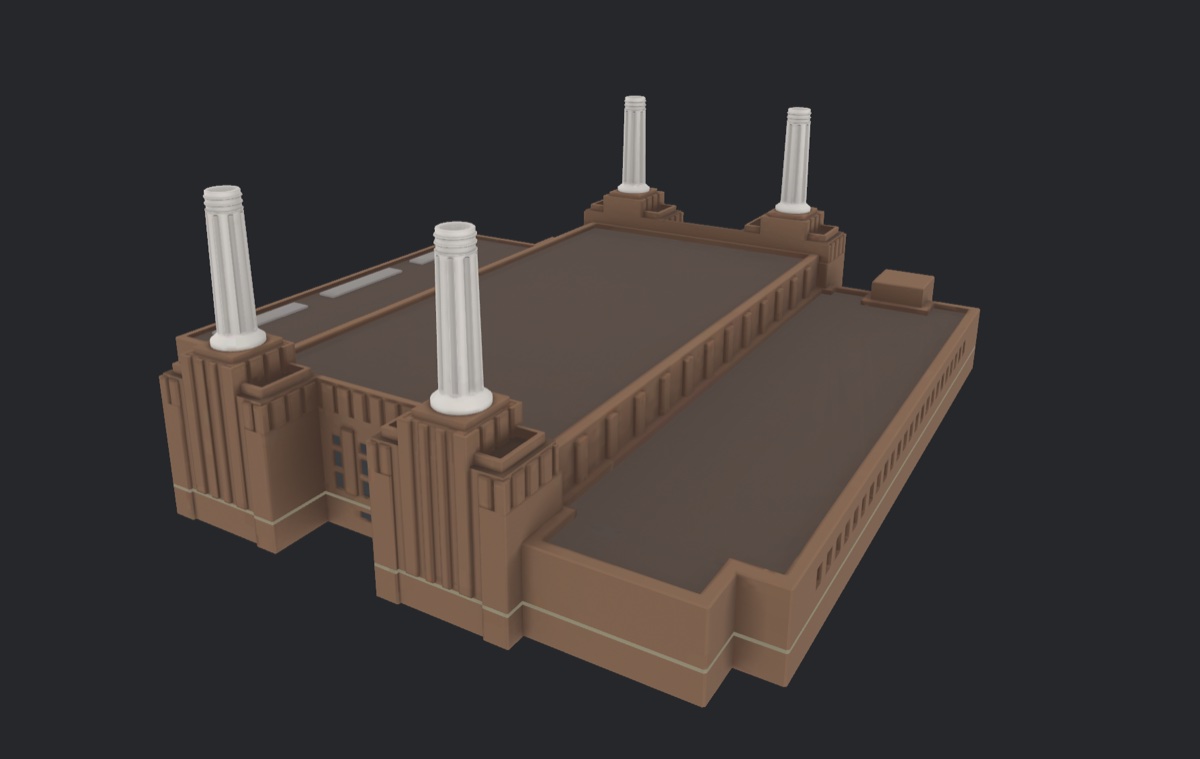
The code is at code.lev.cx/lev/vmp4-mesh. It’s a Rust CLI that exports GLB files, with the format notes in research/.
Finding the cache
Maps doesn’t download tiles itself. A system daemon called geod does that for every app, and it keeps them in an SQLite database:
~/Library/Containers/com.apple.geod/Data/Library/Caches/com.apple.geod/Vault/MapTiles/MapTiles.sqlitedb
That Vault folder is protected by SIP, so even root can’t read it on a normal Mac. My first copy came from a macOS VM with SIP turned off. That got me started, but a VM’s cache only holds what you happened to look at in it.
The better route turned out to be asking geod itself. GeoServices, the private framework Maps uses, has a tile loader that any process can call, and geod answers from its cache, or downloads the tile if you allow it. So a small Objective-C tool can fetch one tile at a time with SIP left on, and the vault never has to be opened.
Every tile has a 128-bit key. It packs a tileset id, a zoom (6 bits, not the 7 an older tool assumed), and the tile’s x and y. Most tiles are map data in a container called VMP4. The 3D models are a separate kind of tile, and their payloads start with readable magic bytes: DVas for the models and DvMt for their materials. “DV” turns out to be DaVinci, which is Apple’s internal name for the detailed 3D map.
The model format
A DVas file starts with the magic and a version, and every file I had was version 20. Then a table of levels of detail, and the first mystery.
At offset 8 there was always either 01 00 or 03 00, followed by fa 00, and I read it as a 16-bit number. It isn’t one. It’s two bytes: a LOD count, then the id of the first LOD. The fa 00 after it is that LOD’s threshold, 250. Files with three LODs have thresholds of 250, 100 and 50, and each LOD covers the range down to the next one. I still don’t know the units.
After that comes a bounding box (a minimum and a size, rather than a minimum and a maximum), the vertex formats, the meshes, the materials and a node tree that places meshes relative to each other. That part is plain bookkeeping. The meshes are where it gets hard.
Compressed meshes
Most meshes are compressed, and the blob starts with 71 8e a2 fa, followed by a CRC32 of the rest. Inside, it’s a proper mesh codec. Connectivity is coded as triangle fans around each vertex. Each new vertex position is predicted from the triangle next to it, by completing a parallelogram, and only the difference from that guess is stored. All of it goes through an adaptive arithmetic coder.
If you know mesh compression, that sounds a lot like Open3DGC. It’s clearly the same family, but it isn’t compatible: the arithmetic coder, the set of fan operations and the contexts are all different. So no existing decoder would read it, and I worked it out from Apple’s own decoder in VectorKit, the framework that renders the map.
The check I trusted most was that a decoder has to land exactly on the end of the data. Across 42 sample files, every container parsed to its last byte, all 121 meshes decoded, and every vertex and triangle count matched the header. Wembley’s stadium comes out as 27,746 vertices and 19,448 triangles, and its decoded bounds match the header’s bounding box to the bit.
Textures live in the DvMt files as ASTC, the block-compressed format GPUs read directly. My first version shelled out to sips to convert them. It now decodes them itself, so exporting works on Linux too, as long as you bring tiles fetched on a Mac.
Asking macOS for the answers
Guessing a format from samples tells you what’s likely. For the rest of the map I wanted something stricter, and macOS already ships a decoder for every one of these tiles.
So I wrote a small tool that loads the system GeoServices, hands it a cached tile, and dumps what it decoded: vertices, triangles, rasters. Everything runs locally and offline. That made every question checkable. If my decoder disagreed with the system’s by a single vertex, it was wrong, and I knew exactly where.
That oracle is what made the next two parts possible.
It also made it safe to have help. I didn’t do this alone: I used Claude Code agents for most of the heavy lifting, reading the decompiled decoders, writing Python prototypes and porting them to Rust. I chose what to go after, steered them out of dead ends and checked the renders. An agent will happily hand you a decoder that looks right, so nothing counted as decoded until it matched macOS’s own output exactly.
The ground
A landmark floating in black space is nice, but I wanted Wembley standing on Wembley. The ground lives in a different tileset and has three layers.
Terrain is a 64×64, 16-bit greyscale PNG embedded in the tile. Heights run from −12,000 to +12,000 metres across the 16-bit range. Wembley’s tile came out at 77.6 to 99.6 m, which is about 46 m higher than Ordnance Survey maps say. 46 m is exactly how far the geoid sits from the WGS84 ellipsoid in London, so these are almost certainly ellipsoidal heights, not heights above sea level.
Ground meshes are roads, pavements and paths, shaped to follow the terrain. They use the same mesh codec as the landmarks, plus an extra stream I hadn’t needed before: a number per triangle that says what it is, road or pavement or path.
Land cover is a 1024×1024 raster where every pixel points at a stack of material ids: a base of plain land, with overlays like park or pitch on top. The ids are just numbers, and the cache has no style sheet that names them.
The way I named them was by using the points of interest in the same tiles. Every POI has a name and a position, so I looked up which material sits under each one. The id under “APCOA”, “Pink Car Park” and “Tesco Click+Collect” is clearly parking. The one under 157 shops on Ealing Road is commercial. One id sits under the “Wembley Stadium” POI and forms a 112×71 m rectangle in the middle of the bowl, which is the pitch.
Against the system decoder, the ground meshes matched to within 4×10⁻⁹ of a tile, and 21 of 22 land cover rasters matched exactly. The one that didn’t was outside the area I cared about and uses a feature I haven’t implemented.
Putting the stadium on it
Each landmark has a placement record in the buildings tileset: a position inside the tile, a scale and a rotation. Wembley’s scale is 0.000817666. That number looked random until I noticed it’s 1/1222.99, and 1222.99 m is the width of a zoom-15 tile in Web Mercator.
So the model’s units are Mercator metres, which are stretched by latitude. At Wembley, one Mercator metre is only cos(51.56°) = 0.62 real metres across the ground. Heights aren’t stretched, so Z is in real metres. If you skip that, the stadium comes out about 60% too wide and too long.
With that fixed, the numbers line up:
- the top of the arch is 131.9 m above the model’s origin, and the real arch is 133 m tall
- the centre of the placed stadium is 4.1 m from its published coordinate
- the arch is on the north side, as it should be
The buildings around it
The ordinary buildings are their own chapter with their own codec: footprints and heights, compressed with the same family of tricks, then extruded into blocks. My decoder matches the system’s on all 31 cached tiles, down to every vertex and every height.
The best bug of the whole project was here. The ground and the buildings came out of separate investigations, and they disagreed on which way Y pointed. One had +Y as north, the other as south. Each was internally consistent, so both looked fine on their own, and the mismatch only mattered once they had to share one scene.
There was also a bug that wasn’t one. North of the stadium, the ground had white holes in it, which looked exactly like a decoder dropping tiles. It wasn’t. The VM’s cache just didn’t have them, because I’d never scrolled there. Fetching through geod returns the whole block, and the holes went away.
Where it’s at
vmp4-mesh export-asset turns any cached landmark into a textured GLB, optionally standing on its terrain with the surrounding buildings, and --night swaps in the night textures. export-ground does the same for any point on the map without a landmark.
It isn’t Apple Maps yet. Next to the real thing, a few things give it away:
- land cover edges are blocky, because I sample the raster as cells, and the real renderer clearly smooths them
- every building is a flat-topped extrusion. The format has a roof flag, but it’s 0 everywhere I’ve looked
- there are no trees, and I haven’t found where they live
- another chapter, which looks like low-detail stand-ins for the landmarks, decodes fine but I don’t know what it’s for
Each of those is one more thing to diff against the oracle, which is the nice part of this project: macOS will always tell me when I’m wrong.