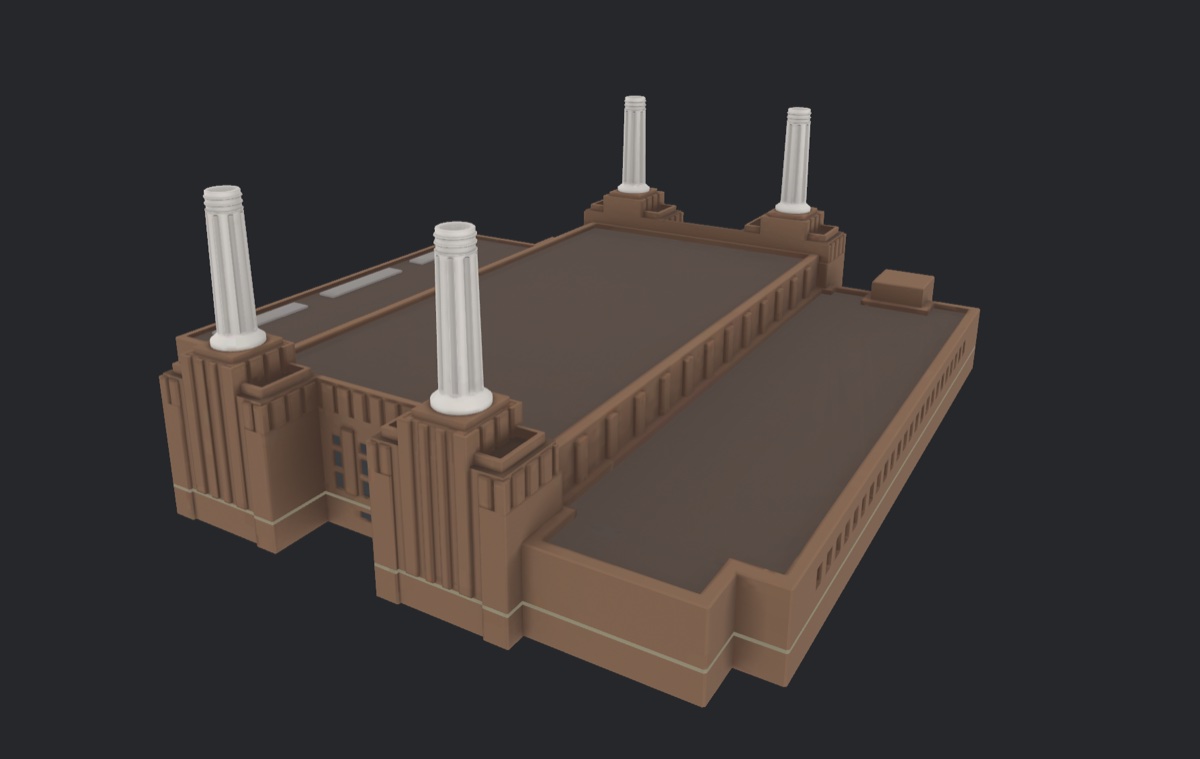
<?xml version="1.0" encoding="utf-8"?><feed xmlns="http://www.w3.org/2005/Atom" xml:lang="en-GB"><generator uri="https://jekyllrb.com/" version="4.4.1">Jekyll</generator><link href="https://lev.cx/feed.xml" rel="self" type="application/atom+xml" /><link href="https://lev.cx/" rel="alternate" type="text/html" hreflang="en-GB" /><updated>2026-10-13T20:03:20+00:00</updated><id>https://lev.cx/feed.xml</id><title type="html">Lev</title><subtitle>I build apps, love wearables, and experiment with technology.</subtitle><entry><title type="html">I pulled Apple Maps’ 3D landmarks out of the macOS cache</title><link href="https://lev.cx/2026/10/13/apple-maps-3d-landmarks" rel="alternate" type="text/html" title="I pulled Apple Maps’ 3D landmarks out of the macOS cache" /><published>2026-10-13T00:00:00+00:00</published><updated>2026-10-13T00:00:00+00:00</updated><id>https://lev.cx/2026/10/13/apple-maps-3d-landmarks</id><content type="html" xml:base="https://lev.cx/2026/10/13/apple-maps-3d-landmarks"><![CDATA[<p>Zoom into London in Apple Maps on a Mac and some buildings stop being grey boxes. Wembley gets its arch, Battersea Power Station gets its four chimneys, and The Shard is a proper glass spike. Those are hand-made models, and Maps keeps them in a cache on disk. I wanted them as ordinary 3D files I could open in Blender.</p>

<blockquote>
  <p><strong>Important</strong><br />
This is unofficial documentation of formats used by Apple Maps on macOS 26. It is not affiliated with or endorsed by Apple. The models are Apple’s and the original artists’ work. I don’t publish any map data, and you shouldn’t redistribute what you export. The formats may change in any update.</p>
</blockquote>

<p><img src="/assets/images/vmp4-battersea.jpg" alt="A 3D model of Battersea Power Station, with its four white chimneys, exported from the Apple Maps cache." /></p>

<p>The code is at <a href="https://code.lev.cx/lev/vmp4-mesh">code.lev.cx/lev/vmp4-mesh</a>. It’s a Rust CLI that exports GLB files, with the format notes in <code class="language-plaintext highlighter-rouge">research/</code>.</p>

<h2 id="finding-the-cache">Finding the cache</h2>

<p>Maps doesn’t download tiles itself. A system daemon called <code class="language-plaintext highlighter-rouge">geod</code> does that for every app, and it keeps them in an SQLite database:</p>

<div class="language-plaintext highlighter-rouge"><div class="highlight"><pre class="highlight"><code>~/Library/Containers/com.apple.geod/Data/Library/Caches/com.apple.geod/Vault/MapTiles/MapTiles.sqlitedb
</code></pre></div></div>

<p>That <code class="language-plaintext highlighter-rouge">Vault</code> folder is protected by SIP, so even root can’t read it on a normal Mac. My first copy came from a macOS VM with SIP turned off. That got me started, but a VM’s cache only holds what you happened to look at in it.</p>

<p>The better route turned out to be asking <code class="language-plaintext highlighter-rouge">geod</code> itself. GeoServices, the private framework Maps uses, has a tile loader that any process can call, and <code class="language-plaintext highlighter-rouge">geod</code> answers from its cache, or downloads the tile if you allow it. So a small Objective-C tool can fetch one tile at a time with SIP left on, and the vault never has to be opened.</p>

<p>Every tile has a 128-bit key. It packs a tileset id, a zoom (6 bits, not the 7 an older tool assumed), and the tile’s x and y. Most tiles are map data in a container called VMP4. The 3D models are a separate kind of tile, and their payloads start with readable magic bytes: <code class="language-plaintext highlighter-rouge">DVas</code> for the models and <code class="language-plaintext highlighter-rouge">DvMt</code> for their materials. “DV” turns out to be DaVinci, which is Apple’s internal name for the detailed 3D map.</p>

<h2 id="the-model-format">The model format</h2>

<p>A <code class="language-plaintext highlighter-rouge">DVas</code> file starts with the magic and a version, and every file I had was version 20. Then a table of levels of detail, and the first mystery.</p>

<p>At offset 8 there was always either <code class="language-plaintext highlighter-rouge">01 00</code> or <code class="language-plaintext highlighter-rouge">03 00</code>, followed by <code class="language-plaintext highlighter-rouge">fa 00</code>, and I read it as a 16-bit number. It isn’t one. It’s two bytes: a LOD count, then the id of the first LOD. The <code class="language-plaintext highlighter-rouge">fa 00</code> after it is that LOD’s threshold, 250. Files with three LODs have thresholds of 250, 100 and 50, and each LOD covers the range down to the next one. I still don’t know the units.</p>

<p>After that comes a bounding box (a minimum and a size, rather than a minimum and a maximum), the vertex formats, the meshes, the materials and a node tree that places meshes relative to each other. That part is plain bookkeeping. The meshes are where it gets hard.</p>

<h2 id="compressed-meshes">Compressed meshes</h2>

<p>Most meshes are compressed, and the blob starts with <code class="language-plaintext highlighter-rouge">71 8e a2 fa</code>, followed by a CRC32 of the rest. Inside, it’s a proper mesh codec. Connectivity is coded as triangle fans around each vertex. Each new vertex position is predicted from the triangle next to it, by completing a parallelogram, and only the difference from that guess is stored. All of it goes through an adaptive arithmetic coder.</p>

<p>If you know mesh compression, that sounds a lot like Open3DGC. It’s clearly the same family, but it isn’t compatible: the arithmetic coder, the set of fan operations and the contexts are all different. So no existing decoder would read it, and I worked it out from Apple’s own decoder in VectorKit, the framework that renders the map.</p>

<p>The check I trusted most was that a decoder has to land exactly on the end of the data. Across 42 sample files, every container parsed to its last byte, all 121 meshes decoded, and every vertex and triangle count matched the header. Wembley’s stadium comes out as 27,746 vertices and 19,448 triangles, and its decoded bounds match the header’s bounding box to the bit.</p>

<p>Textures live in the <code class="language-plaintext highlighter-rouge">DvMt</code> files as ASTC, the block-compressed format GPUs read directly. My first version shelled out to <code class="language-plaintext highlighter-rouge">sips</code> to convert them. It now decodes them itself, so exporting works on Linux too, as long as you bring tiles fetched on a Mac.</p>

<h2 id="asking-macos-for-the-answers">Asking macOS for the answers</h2>

<p>Guessing a format from samples tells you what’s likely. For the rest of the map I wanted something stricter, and macOS already ships a decoder for every one of these tiles.</p>

<p>So I wrote a small tool that loads the system GeoServices, hands it a cached tile, and dumps what it decoded: vertices, triangles, rasters. Everything runs locally and offline. That made every question checkable. If my decoder disagreed with the system’s by a single vertex, it was wrong, and I knew exactly where.</p>

<p>That oracle is what made the next two parts possible.</p>

<p>It also made it safe to have help. I didn’t do this alone: I used <a href="https://www.anthropic.com/claude-code">Claude Code</a> agents for most of the heavy lifting, reading the decompiled decoders, writing Python prototypes and porting them to Rust. I chose what to go after, steered them out of dead ends and checked the renders. An agent will happily hand you a decoder that looks right, so nothing counted as decoded until it matched macOS’s own output exactly.</p>

<h2 id="the-ground">The ground</h2>

<p>A landmark floating in black space is nice, but I wanted Wembley standing on Wembley. The ground lives in a different tileset and has three layers.</p>

<p><strong>Terrain</strong> is a 64×64, 16-bit greyscale PNG embedded in the tile. Heights run from −12,000 to +12,000 metres across the 16-bit range. Wembley’s tile came out at 77.6 to 99.6 m, which is about 46 m higher than Ordnance Survey maps say. 46 m is exactly how far the geoid sits from the WGS84 ellipsoid in London, so these are almost certainly ellipsoidal heights, not heights above sea level.</p>

<p><strong>Ground meshes</strong> are roads, pavements and paths, shaped to follow the terrain. They use the same mesh codec as the landmarks, plus an extra stream I hadn’t needed before: a number per triangle that says what it is, road or pavement or path.</p>

<p><strong>Land cover</strong> is a 1024×1024 raster where every pixel points at a stack of material ids: a base of plain land, with overlays like park or pitch on top. The ids are just numbers, and the cache has no style sheet that names them.</p>

<p>The way I named them was by using the points of interest in the same tiles. Every POI has a name and a position, so I looked up which material sits under each one. The id under “APCOA”, “Pink Car Park” and “Tesco Click+Collect” is clearly parking. The one under 157 shops on Ealing Road is commercial. One id sits under the “Wembley Stadium” POI and forms a 112×71 m rectangle in the middle of the bowl, which is the pitch.</p>

<p>Against the system decoder, the ground meshes matched to within 4×10⁻⁹ of a tile, and 21 of 22 land cover rasters matched exactly. The one that didn’t was outside the area I cared about and uses a feature I haven’t implemented.</p>

<h2 id="putting-the-stadium-on-it">Putting the stadium on it</h2>

<p>Each landmark has a placement record in the buildings tileset: a position inside the tile, a scale and a rotation. Wembley’s scale is 0.000817666. That number looked random until I noticed it’s 1/1222.99, and 1222.99 m is the width of a zoom-15 tile in Web Mercator.</p>

<p>So the model’s units are Mercator metres, which are stretched by latitude. At Wembley, one Mercator metre is only cos(51.56°) = 0.62 real metres across the ground. Heights aren’t stretched, so Z is in real metres. If you skip that, the stadium comes out about 60% too wide and too long.</p>

<p>With that fixed, the numbers line up:</p>

<ul>
  <li>the top of the arch is 131.9 m above the model’s origin, and the real arch is 133 m tall</li>
  <li>the centre of the placed stadium is 4.1 m from its published coordinate</li>
  <li>the arch is on the north side, as it should be</li>
</ul>

<h2 id="the-buildings-around-it">The buildings around it</h2>

<p>The ordinary buildings are their own chapter with their own codec: footprints and heights, compressed with the same family of tricks, then extruded into blocks. My decoder matches the system’s on all 31 cached tiles, down to every vertex and every height.</p>

<p>The best bug of the whole project was here. The ground and the buildings came out of separate investigations, and they disagreed on which way Y pointed. One had +Y as north, the other as south. Each was internally consistent, so both looked fine on their own, and the mismatch only mattered once they had to share one scene.</p>

<p>There was also a bug that wasn’t one. North of the stadium, the ground had white holes in it, which looked exactly like a decoder dropping tiles. It wasn’t. The VM’s cache just didn’t have them, because I’d never scrolled there. Fetching through <code class="language-plaintext highlighter-rouge">geod</code> returns the whole block, and the holes went away.</p>

<h2 id="where-its-at">Where it’s at</h2>

<p><code class="language-plaintext highlighter-rouge">vmp4-mesh export-asset</code> turns any cached landmark into a textured GLB, optionally standing on its terrain with the surrounding buildings, and <code class="language-plaintext highlighter-rouge">--night</code> swaps in the night textures. <code class="language-plaintext highlighter-rouge">export-ground</code> does the same for any point on the map without a landmark.</p>

<p>It isn’t Apple Maps yet. Next to the real thing, a few things give it away:</p>

<ul>
  <li>land cover edges are blocky, because I sample the raster as cells, and the real renderer clearly smooths them</li>
  <li>every building is a flat-topped extrusion. The format has a roof flag, but it’s 0 everywhere I’ve looked</li>
  <li>there are no trees, and I haven’t found where they live</li>
  <li>another chapter, which looks like low-detail stand-ins for the landmarks, decodes fine but I don’t know what it’s for</li>
</ul>

<p>Each of those is one more thing to diff against the oracle, which is the nice part of this project: macOS will always tell me when I’m wrong.</p>]]></content><author><name></name></author><summary type="html"><![CDATA[Apple Maps on the Mac draws hand-modelled 3D landmarks, and it keeps them in a local cache. I decoded the models, the terrain under them and the buildings around them, and now they export as GLB files.]]></summary><media:thumbnail xmlns:media="http://search.yahoo.com/mrss/" url="https://lev.cx/assets/images/vmp4-battersea.jpg" /><media:content medium="image" url="https://lev.cx/assets/images/vmp4-battersea.jpg" xmlns:media="http://search.yahoo.com/mrss/" /></entry><entry><title type="html">I reverse engineered KineMaster’s project format</title><link href="https://lev.cx/2026/09/20/kinemaster-file-format" rel="alternate" type="text/html" title="I reverse engineered KineMaster’s project format" /><published>2026-09-20T00:00:00+00:00</published><updated>2026-09-20T00:00:00+00:00</updated><id>https://lev.cx/2026/09/20/kinemaster-file-format</id><content type="html" xml:base="https://lev.cx/2026/09/20/kinemaster-file-format"><![CDATA[<p><a href="https://apps.apple.com/us/app/kinemaster-ai-video-editor/id1609369954">KineMaster</a> is a mobile video editor, and it can export a project as a <code class="language-plaintext highlighter-rouge">.kine</code> file. I wanted to build projects outside the app, so I set about working out what is inside one.</p>

<blockquote>
  <p><strong>Important</strong><br />
This is unofficial documentation of the <code class="language-plaintext highlighter-rouge">.kine</code> file format based on files exported by KineMaster 8.1.17.2420 on iOS. It is not affiliated with or endorsed by KineMaster. The format may change in future versions. This is about interoperability, not about unlocking anything paid.</p>
</blockquote>

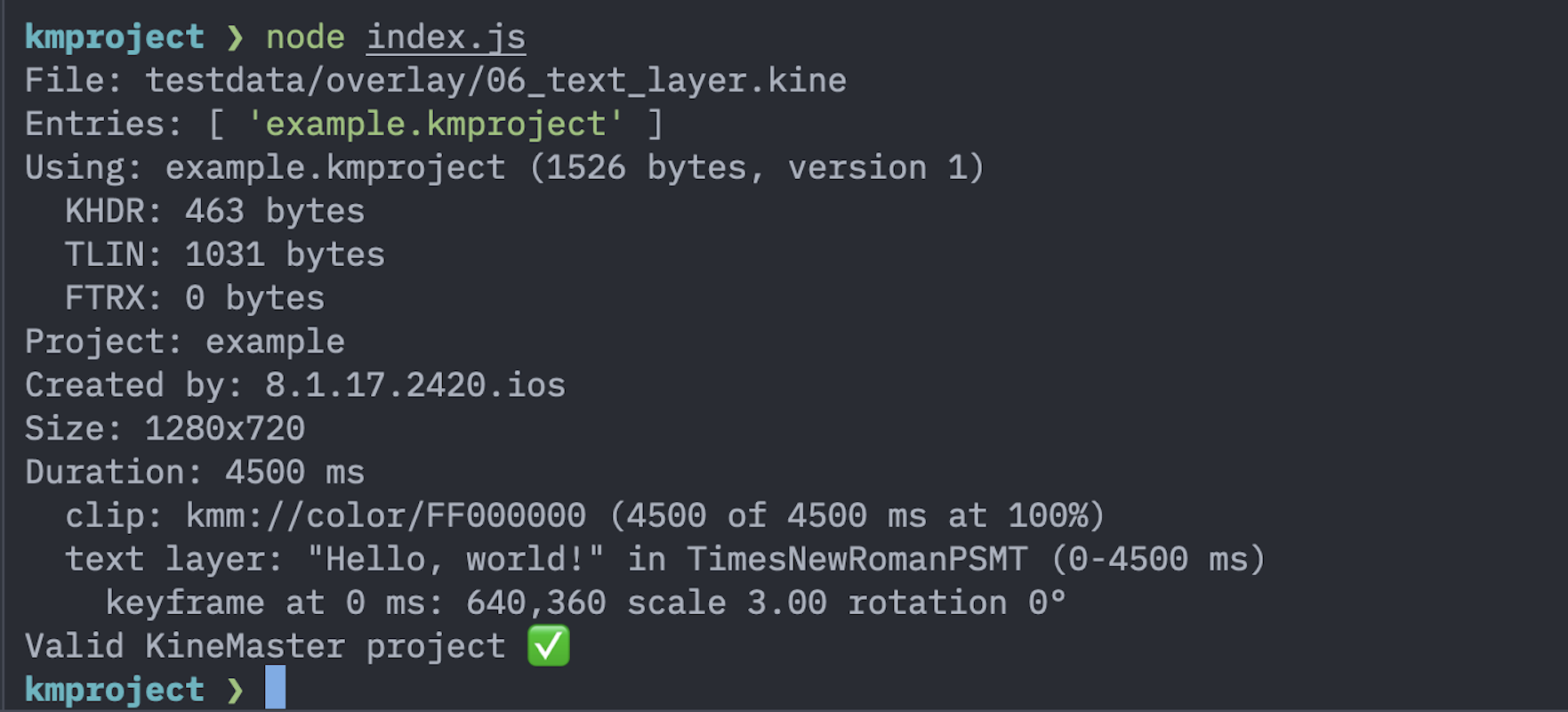
<p><img src="/assets/images/node-parsing-kine-file.png" alt="Terminal output showing Node.js parsing a KineMaster .kine file and validating the project structure." /></p>

<h2 id="opening-the-file">Opening the file</h2>

<p><code class="language-plaintext highlighter-rouge">unzip -l</code> was enough to get started. A <code class="language-plaintext highlighter-rouge">.kine</code> is a ZIP, holding a <code class="language-plaintext highlighter-rouge">.kmproject</code> file named after the project, plus a <code class="language-plaintext highlighter-rouge">contents/</code> folder with any imported media.</p>

<p>The media handling is inconsistent in a way that matters later. Video and audio are copied in byte for byte, but renamed to a numeric id such as <code class="language-plaintext highlighter-rouge">1000.mov</code>. Images are re-encoded as JPEG, and may keep their original name or be given a UUID depending on where they were imported from. Solid colours are not stored as files at all. So the file names can’t be trusted, and anything reading these files should resolve media through the reference in the project rather than by looking at <code class="language-plaintext highlighter-rouge">contents/</code>.</p>

<h2 id="the-kmproject-container">The <code class="language-plaintext highlighter-rouge">.kmproject</code> container</h2>

<p>The <code class="language-plaintext highlighter-rouge">.kmproject</code> opens with <code class="language-plaintext highlighter-rouge">f3 4b 4d ea</code>, which shows up as <code class="language-plaintext highlighter-rouge">.KM.</code> in a hex dump. It isn’t a single blob; it’s a small chunked container:</p>

<div class="language-plaintext highlighter-rouge"><div class="highlight"><pre class="highlight"><code>f3 4b 4d ea               magic
00 00 00 01               version, big-endian uint32
repeated chunk:
  4-byte tag              "KHDR" -&gt; project header
                          "TLIN" -&gt; timeline
                          "FTRX" -&gt; end marker, always length 0
  big-endian uint32       payload length
  payload                 (no checksum)
</code></pre></div></div>

<p>The tags appear to be abbreviations: header, timeline, and presumably a footer. The chunk lengths chain exactly to the end of the file, which makes a nice integrity check, and there is no checksum anywhere.</p>

<p>The payloads inside <code class="language-plaintext highlighter-rouge">KHDR</code> and <code class="language-plaintext highlighter-rouge">TLIN</code> turned out to be Protocol Buffers. There’s no schema shipped with the file, of course, so <code class="language-plaintext highlighter-rouge">protoc --decode_raw</code> gives you field numbers and values but no names:</p>

<div class="language-plaintext highlighter-rouge"><div class="highlight"><pre class="highlight"><code>2: 2420
8: 4500
101: "com.nexstreaming.kinemaster.basic"
109: "example"
</code></pre></div></div>

<p>That is enough to start guessing. Field 8 was 4500 in a project that was 4.5 seconds long, 109 was the project name, and 101 was clearly the app id.</p>

<h2 id="seventeen-samples">Seventeen samples</h2>

<p>Guessing field by field from one file gets you nowhere, so I made 17 sample projects, each changing exactly one thing from a baseline: a black screen with nothing else. One sample trimmed a video. One added a crossfade. One rotated some text by 37 degrees. One changed the font.</p>

<p>Then it’s just diffing. The trimmed video sample changed exactly two fields, 128 and 129, to 1913 and 1180. The source video was 5000 ms, and the header duration in that sample was 1907. 5000 − 1913 − 1180 = 1907, so 128 and 129 are the trims taken off the start and end, and the played length is what remains. No guesswork needed.</p>

<p>The crossfade sample was similar. A 5000 ms clip and a 4500 ms clip, with a 1500 ms crossfade between them, gave a project 8000 ms long: 5000 + 4500 − 1500. So transitions overlap their neighbours rather than sitting between them, which also explains why clips don’t store a start time anywhere. Each clip’s position falls out of the durations and overlaps before it.</p>

<p>Setting speed to 2x changed one field from 100 to 200 and halved the header duration. Volume at 37% changed one field to 37. Those are percentages, which is unremarkable but worth knowing.</p>

<h2 id="the-timeline">The timeline</h2>

<p>The timeline chunk has two lists. One is the primary track, in playback order, alternating clip, transition, clip, transition — every clip gets a transition slot after it, holding an asset id of <code class="language-plaintext highlighter-rouge">none</code> when you haven’t set one. The other is the layers: text, images, videos and audio, listed bottom to top. Unlike clips, layers carry absolute start and end times, and a layer is allowed to run past the end of the primary track.</p>

<p>Each item carries a 128-bit id, a type, and a body that depends on the type:</p>

<table>
  <thead>
    <tr>
      <th>Type</th>
      <th>Body field</th>
      <th>Contents</th>
    </tr>
  </thead>
  <tbody>
    <tr>
      <td>1</td>
      <td>4</td>
      <td>Clip</td>
    </tr>
    <tr>
      <td>2</td>
      <td>5</td>
      <td>Transition</td>
    </tr>
    <tr>
      <td>3</td>
      <td>6</td>
      <td>Audio</td>
    </tr>
    <tr>
      <td>4</td>
      <td>7</td>
      <td>Text</td>
    </tr>
    <tr>
      <td>7</td>
      <td>9</td>
      <td>Image</td>
    </tr>
    <tr>
      <td>8</td>
      <td>11</td>
      <td>Video</td>
    </tr>
  </tbody>
</table>

<p>Types 5 and 6, with bodies 8 and 10, are presumably stickers and handwriting. I didn’t sample those: KineMaster’s stickers are their own artwork and you can’t import your own, so there was nothing I could make a sample from without copying theirs.</p>

<p>Media is referenced by URI rather than by path:</p>

<table>
  <thead>
    <tr>
      <th>URI</th>
      <th>Meaning</th>
    </tr>
  </thead>
  <tbody>
    <tr>
      <td><code class="language-plaintext highlighter-rouge">kmm://path-rel/&lt;path in ZIP&gt;</code></td>
      <td>Imported media</td>
    </tr>
    <tr>
      <td><code class="language-plaintext highlighter-rouge">kmm://color/AARRGGBB</code></td>
      <td>Solid colour</td>
    </tr>
    <tr>
      <td><code class="language-plaintext highlighter-rouge">kmm://font/&lt;PostScript name&gt;</code></td>
      <td>Font</td>
    </tr>
    <tr>
      <td><code class="language-plaintext highlighter-rouge">kmm://assetitemid/&lt;id&gt;</code></td>
      <td>Built-in asset, or <code class="language-plaintext highlighter-rouge">none</code></td>
    </tr>
  </tbody>
</table>

<p>That’s also why the black screen sample has no media file in it at all. The clip just points at <code class="language-plaintext highlighter-rouge">kmm://color/FF000000</code>.</p>

<h2 id="units-that-surprised-me">Units that surprised me</h2>

<p>Pan and zoom, the Ken Burns effect, is stored as two rectangles: where the view starts and where it ends. The values are in 1/100000 of the source image, so the default full frame is <code class="language-plaintext highlighter-rouge">(0, 100000, 100000, 0)</code>. Zooming out pushes values outside that range, which is how I ended up staring at <code class="language-plaintext highlighter-rouge">-33718</code>.</p>

<p>Working out the field order took a while. What settled it: if the order is left, bottom, right, top, then both rectangles come out exactly as wide as they are tall in these units. That’s what a 16:9 view of a 16:9 image should give, and it held for both the zoomed-out start and the zoomed-in end. Any other ordering gave nonsense aspect ratios.</p>

<p>Keyframe times are the other trap. I expected milliseconds; they’re a fraction of the layer’s duration. My three-keyframe sample stored 0, 0.2278 and 0.4591, which against a 4500 ms layer works out to 0, 1025 and 2066 ms.</p>

<p>Everything else is what you’d expect. Positions are in canvas pixels, so 640, 360 is the centre of a 1280x720 project. Rotation is in degrees, which the 37 degree sample confirmed exactly. Colours are ARGB. Other times are milliseconds.</p>

<p>One nice detail: each layer stores a base size as a fraction of the canvas, and for text that’s the measured text box. Switching the font from Times New Roman to Arial nudged it from 0.1039 to 0.1070, because Arial renders “Hello, world!” slightly wider.</p>

<h2 id="writing-one-back">Writing one back</h2>

<p>Documenting a format is one thing; the real test is whether the app accepts what you write.</p>

<p>I wrote a protobuf schema naming every field I’d seen, then checked something that turns out to matter a lot: decode a file and re-encode it, and you should get byte-for-byte identical output. Getting there took two adjustments. Every field has to be declared, including the ones whose meaning is a mystery, because an encoder appends unrecognised fields at the end and reorders the file. And KineMaster writes zero values explicitly, so a schema that treats zero as “absent” silently drops them. Once both were handled, all 17 samples round-tripped exactly.</p>

<p>Then I generated three files: one that only changed the project name, one with different text in a different colour, and one shortened from 4500 to 2000 ms. I AirDropped them over and opened them.</p>

<p>All three worked. The text sample showed my new text in orange; the shortened sample really was 2 seconds. The duration one was the interesting check, because a project’s length is written in several places at once, and a missed one would have shown up as a 4.5 second clip. It didn’t.</p>

<p>I also left the thumbnail in the header stale, still showing the old project, and the app didn’t care. It re-rendered it after the first edit.</p>

<h2 id="future-work">Future work</h2>

<p>Plenty is still unmapped. My favourites, in the sense of most annoying:</p>

<ul>
  <li>Two more rectangles sitting next to the pan and zoom ones, identical in all 17 samples at <code class="language-plaintext highlighter-rouge">(-108024, 100000, 208024, 0)</code>. They never moved, so I have nothing to diff.</li>
  <li>Six floats on image and video layers holding 0.72, 0.5, 0.25, 0.25, 0.75, 0.75, which look like chroma key settings, including the two control points from the key curve.</li>
  <li>A field that always equals the clip’s source duration, and has to be updated alongside it, for reasons I can’t explain.</li>
  <li>A second transform-shaped block on every layer that isn’t one of the keyframes.</li>
</ul>

<p>Each of those would fall out of one more sample changing one more setting, which is the whole method really: change one thing, diff, write down what moved.</p>]]></content><author><name></name></author><summary type="html"><![CDATA[KineMaster exports projects as .kine files. I made 17 sample projects, diffed them against each other, and ended up generating a project file that the app opened without complaint.]]></summary><media:thumbnail xmlns:media="http://search.yahoo.com/mrss/" url="https://lev.cx/assets/images/node-parsing-kine-file.png" /><media:content medium="image" url="https://lev.cx/assets/images/node-parsing-kine-file.png" xmlns:media="http://search.yahoo.com/mrss/" /></entry><entry><title type="html">Widgy’s File Format</title><link href="https://lev.cx/2026/09/05/widgy-file-format" rel="alternate" type="text/html" title="Widgy’s File Format" /><published>2026-09-05T00:00:00+00:00</published><updated>2026-09-05T00:00:00+00:00</updated><id>https://lev.cx/2026/09/05/widgy-file-format</id><content type="html" xml:base="https://lev.cx/2026/09/05/widgy-file-format"><![CDATA[<p><a href="https://apps.apple.com/us/app/widgy-widgets-home-lock-watch/id1524540481">Widgy</a> is an app which lets you create widgets for your home and lock screen on iOS by using their human-friendly editor. The editor is fine for small widgets, but when it comes to bigger widgets, there is a problem to solve.</p>

<blockquote>
  <p><strong>Important</strong><br />
This is an unofficial documentation of the <code class="language-plaintext highlighter-rouge">.widgy</code> file format based on files exported by Widgy. It is not affiliated with or endorsed by Widgy. The format may change in future versions.</p>
</blockquote>

<p>I am a fan of their app, and I have even purchased the expansion slots for home screen widgets, so I am familiar with the app. There is a feature which lets you export your widgets as a <code class="language-plaintext highlighter-rouge">.widgy</code> file. I made a sample widget and exported it, then transferred it to my Mac.</p>

<h2 id="decoding-the-widgy-file">Decoding the <code class="language-plaintext highlighter-rouge">.widgy</code> file</h2>

<p>I tried opening it in a text editor, but I was met with binary and unreadable text. I popped it into <a href="https://gchq.github.io/CyberChef/">CyberChef</a>, and used their <strong>Magic</strong> operation, but that led to no results.</p>

<p>After a bit of messing around in CyberChef, I got a recipe that worked: <strong>Raw Inflate</strong>. There is no need to change any parameters, as the default parameters worked, but it did give me a readable JSON.</p>

<h2 id="the-json-format">The JSON format</h2>

<p>The JSON format was <em>odd</em>. There weren’t readable keys, instead there were these shortened keys such as <code class="language-plaintext highlighter-rouge">0</code> and <code class="language-plaintext highlighter-rouge">d0</code>. This JSON appeared to be generated from a compact internal schema, with short keys being used instead of descriptive names, but I am not going to go too far to extract the schema.</p>

<p>The following root-level fields have been identified:</p>

<table>
  <thead>
    <tr>
      <th>Key</th>
      <th>Description</th>
    </tr>
  </thead>
  <tbody>
    <tr>
      <td><code class="language-plaintext highlighter-rouge">0</code></td>
      <td>Format/version identifier (appears to be)</td>
    </tr>
    <tr>
      <td><code class="language-plaintext highlighter-rouge">1</code></td>
      <td>Array of layers</td>
    </tr>
    <tr>
      <td><code class="language-plaintext highlighter-rouge">3</code></td>
      <td>Widget name</td>
    </tr>
    <tr>
      <td><code class="language-plaintext highlighter-rouge">5</code></td>
      <td>Author name</td>
    </tr>
    <tr>
      <td><code class="language-plaintext highlighter-rouge">6</code></td>
      <td>Widget size</td>
    </tr>
  </tbody>
</table>

<h2 id="layer-object">Layer object</h2>

<p>The layer object is confusing at first, but I have been able to map some of its fields, including the layer type, names, and handling of groups.</p>

<p>The layer name was stored in the <code class="language-plaintext highlighter-rouge">s</code> key. The layer type (<code class="language-plaintext highlighter-rouge">z</code> key) appears to be an enum with the following values:</p>

<table>
  <thead>
    <tr>
      <th>Value</th>
      <th>Description</th>
    </tr>
  </thead>
  <tbody>
    <tr>
      <td>1</td>
      <td>Text</td>
    </tr>
    <tr>
      <td>15</td>
      <td>Curved Text</td>
    </tr>
    <tr>
      <td>4</td>
      <td>Symbol</td>
    </tr>
    <tr>
      <td>2</td>
      <td>Shape</td>
    </tr>
    <tr>
      <td>5</td>
      <td>Image</td>
    </tr>
    <tr>
      <td>7</td>
      <td>Line Chart</td>
    </tr>
    <tr>
      <td>6</td>
      <td>Bar Chart</td>
    </tr>
    <tr>
      <td>8</td>
      <td>Circle Chart</td>
    </tr>
    <tr>
      <td>12</td>
      <td>Gauge</td>
    </tr>
    <tr>
      <td>16</td>
      <td>Analog Seconds</td>
    </tr>
    <tr>
      <td>17</td>
      <td>Apple Gauge</td>
    </tr>
    <tr>
      <td>10</td>
      <td>Calendar</td>
    </tr>
    <tr>
      <td>11</td>
      <td>Tap Action</td>
    </tr>
    <tr>
      <td>13</td>
      <td>Group (needs special handling, see below)</td>
    </tr>
  </tbody>
</table>

<h3 id="group-handling">Group handling</h3>

<p>The group layer type (value <code class="language-plaintext highlighter-rouge">13</code>) is a special case. When a group layer is encountered, the <code class="language-plaintext highlighter-rouge">1</code> key contains an array of nested layers (just like in the widget root).</p>

<h2 id="sharing-widgets">Sharing widgets</h2>

<h3 id="qr-codes">QR codes</h3>

<p>Widgy also supports sharing widgets through QR codes. After investigating the QR code data, I found that it contains the widget data itself rather than simply pointing to a download URL.</p>

<p>The QR code payload appears to be a Base64 encoded raw DEFLATE stream containing the same JSON structure used by the <code class="language-plaintext highlighter-rouge">.widgy</code> file format.</p>

<p>The process appears to be:</p>

<div class="language-plaintext highlighter-rouge"><div class="highlight"><pre class="highlight"><code>Widget JSON
    ↓
Raw DEFLATE compression
    ↓
Base64 encoding
    ↓
QR code payload
</code></pre></div></div>

<p>Unlike some Base64 implementations used in URLs, this does not appear to use URL-safe Base64 encoding. The standard Base64 alphabet is used.</p>

<p>This means a QR code can contain a complete widget without requiring an external server or download link.</p>

<h2 id="future-work">Future work</h2>

<p>There are still many unknown fields, including positioning, styling, and data sources. I may continue documenting these as I investigate the format further.</p>]]></content><author><name></name></author><summary type="html"><![CDATA[Widgy is an app which lets you create custom widgets for iOS, by designing them in an editor. I wanted to automate the process, so here are my findings on their file format.]]></summary></entry><entry><title type="html">Reverse-engineering a £3.50 Tesco Bluetooth tracker</title><link href="https://lev.cx/2026/08/27/reverse-engineering-tesco-bluetooth-tracker" rel="alternate" type="text/html" title="Reverse-engineering a £3.50 Tesco Bluetooth tracker" /><published>2026-08-27T00:00:00+00:00</published><updated>2026-08-27T00:00:00+00:00</updated><id>https://lev.cx/2026/08/27/reverse-engineering-tesco-bluetooth-tracker</id><content type="html" xml:base="https://lev.cx/2026/08/27/reverse-engineering-tesco-bluetooth-tracker"><![CDATA[<p>I bought a Bluetooth tracker from Tesco for £3.50. It’s sold as a tracker, but it isn’t actually a GPS tracker. Instead, it’s a small Bluetooth Low Energy (BLE) tag called iTAG which connects to an app called iSearching.</p>

<p>Since I don’t have much use for it as a tracker, I decided to find out how it works.</p>

<h2 id="try-it-yourself">Try it yourself</h2>

<p>I also made a small Web Bluetooth tool that connects directly to an iTAG. It can detect button presses and control the tracker’s alarm. Make sure you’re using a compatible browser, such as Chrome or Edge.</p>

<p><a href="/tools/itag">Open the iTAG Web Bluetooth tool →</a></p>

<h2 id="contents">Contents</h2>

<ul>
  <li><a href="#the-isearching-app">The iSearching app</a></li>
  <li><a href="#ble-advertising">BLE advertising</a></li>
  <li><a href="#gatt-services">GATT services</a></li>
  <li><a href="#taking-it-apart">Taking it apart</a></li>
  <li><a href="#decompiling-isearching">Decompiling iSearching</a>
    <ul>
      <li><a href="#starting-with-an-older-version">Starting with an older version</a></li>
      <li><a href="#multiple-generations-of-itag">Multiple generations of iTAG</a></li>
      <li><a href="#a-newer-protocol">A newer protocol</a></li>
      <li><a href="#which-protocol-does-my-itag-use">Which protocol does my iTAG use?</a></li>
      <li><a href="#the-tesco-itag-protocol">The Tesco iTAG protocol</a></li>
    </ul>
  </li>
</ul>

<h2 id="the-isearching-app">The iSearching app</h2>

<p>The recommended app, iSearching, provides a camera remote, last-connected location history, disconnection alarms, voice recording and a button to make the iTAG ring.</p>

<ul>
  <li><strong>iSearching on the Apple App Store</strong>: <a href="https://apps.apple.com/gb/app/isearching/id985954901">iSearching App - App Store</a></li>
  <li><strong>iSearching on the Google Play Store</strong>: <a href="https://play.google.com/store/apps/details?id=com.lenzetech.antilost&amp;hl=en_GB">iSearching - Apps on Google Play</a></li>
</ul>

<p>The tag itself doesn’t contain GPS, a microphone or a camera. Most of those features are implemented by the phone.</p>

<h2 id="ble-advertising">BLE advertising</h2>

<p>I used <a href="https://apps.apple.com/gb/app/lightblue/id557428110">LightBlue</a> on my Mac to inspect the device.</p>

<table>
  <thead>
    <tr>
      <th>Property</th>
      <th>Value</th>
    </tr>
  </thead>
  <tbody>
    <tr>
      <td>Local Name</td>
      <td>iTAG</td>
    </tr>
    <tr>
      <td>Connectable</td>
      <td>Yes</td>
    </tr>
    <tr>
      <td>Service UUIDs</td>
      <td><code class="language-plaintext highlighter-rouge">FFE0</code></td>
    </tr>
    <tr>
      <td>Manufacturer ID</td>
      <td><code class="language-plaintext highlighter-rouge">0x0105</code></td>
    </tr>
    <tr>
      <td>Manufacturer Data</td>
      <td><code class="language-plaintext highlighter-rouge">4F0F025453486602010300</code></td>
    </tr>
  </tbody>
</table>

<p>That manufacturer data becomes important later.</p>

<h2 id="gatt-services">GATT services</h2>

<p>These are the useful characteristics I’ve identified:</p>

<table>
  <thead>
    <tr>
      <th>Service</th>
      <th>Characteristic</th>
      <th>Properties</th>
      <th>Purpose</th>
    </tr>
  </thead>
  <tbody>
    <tr>
      <td><code class="language-plaintext highlighter-rouge">180F</code></td>
      <td><code class="language-plaintext highlighter-rouge">2A19</code></td>
      <td>Read, Notify</td>
      <td>Battery level</td>
    </tr>
    <tr>
      <td><code class="language-plaintext highlighter-rouge">1804</code></td>
      <td><code class="language-plaintext highlighter-rouge">2A07</code></td>
      <td>Read</td>
      <td>Transmit power</td>
    </tr>
    <tr>
      <td><code class="language-plaintext highlighter-rouge">1803</code></td>
      <td><code class="language-plaintext highlighter-rouge">2A06</code></td>
      <td>Read, Write</td>
      <td>Bluetooth link-loss alert</td>
    </tr>
    <tr>
      <td><code class="language-plaintext highlighter-rouge">1802</code></td>
      <td><code class="language-plaintext highlighter-rouge">2A06</code></td>
      <td>Write</td>
      <td>Immediately sound alarm</td>
    </tr>
    <tr>
      <td><code class="language-plaintext highlighter-rouge">FFE0</code></td>
      <td><code class="language-plaintext highlighter-rouge">FFE1</code></td>
      <td>Read, Notify</td>
      <td>Physical button events</td>
    </tr>
    <tr>
      <td><code class="language-plaintext highlighter-rouge">FFE0</code></td>
      <td><code class="language-plaintext highlighter-rouge">FFE3</code></td>
      <td>Read</td>
      <td>Device information</td>
    </tr>
  </tbody>
</table>

<p>Writing <code class="language-plaintext highlighter-rouge">00</code> to <code class="language-plaintext highlighter-rouge">1802/2A06</code> stops the buzzer, while <code class="language-plaintext highlighter-rouge">01</code> or <code class="language-plaintext highlighter-rouge">02</code> starts it.</p>

<p>The Link Loss characteristic at <code class="language-plaintext highlighter-rouge">1803/2A06</code> accepts the same values. Curiously, it initially reads:</p>

<div class="language-text highlighter-rouge"><div class="highlight"><pre class="highlight"><code>3C
</code></pre></div></div>

<p>That’s not a valid standard Alert Level. Writing <code class="language-plaintext highlighter-rouge">00</code>, <code class="language-plaintext highlighter-rouge">01</code> or <code class="language-plaintext highlighter-rouge">02</code> makes subsequent reads return that value until the iTAG is restarted, when it returns to <code class="language-plaintext highlighter-rouge">3C</code>.</p>

<p>The physical button is simpler. Subscribing to notifications from <code class="language-plaintext highlighter-rouge">FFE1</code> produces:</p>

<div class="language-text highlighter-rouge"><div class="highlight"><pre class="highlight"><code>01
</code></pre></div></div>

<p>when the button is pressed. Holding the button powers the iTAG off.</p>

<p><code class="language-plaintext highlighter-rouge">FFE3</code> contains:</p>

<div class="language-text highlighter-rouge"><div class="highlight"><pre class="highlight"><code>4F0F02545348
</code></pre></div></div>

<p>which is exactly the first six bytes of the advertised manufacturer data:</p>

<div class="language-text highlighter-rouge"><div class="highlight"><pre class="highlight"><code>4F0F025453486602010300
</code></pre></div></div>

<p>Its final three bytes are ASCII <code class="language-plaintext highlighter-rouge">TSH</code>, although I don’t yet know what that means.</p>

<p>There are also several unidentified proprietary characteristics:</p>

<div class="language-text highlighter-rouge"><div class="highlight"><pre class="highlight"><code>FFE0
├── FFE1
├── FFE2
├── FFE3
├── FFE4
├── FFE5
├── FFE6
└── FFE7

FF01
├── FF02
└── FF03

AE00
├── AE01
└── AE02
</code></pre></div></div>

<p>Rather than blindly writing arbitrary data to them, I decided to find out what the official app does.</p>

<h2 id="taking-it-apart">Taking it apart</h2>

<p>Naturally, I also opened the tracker.</p>

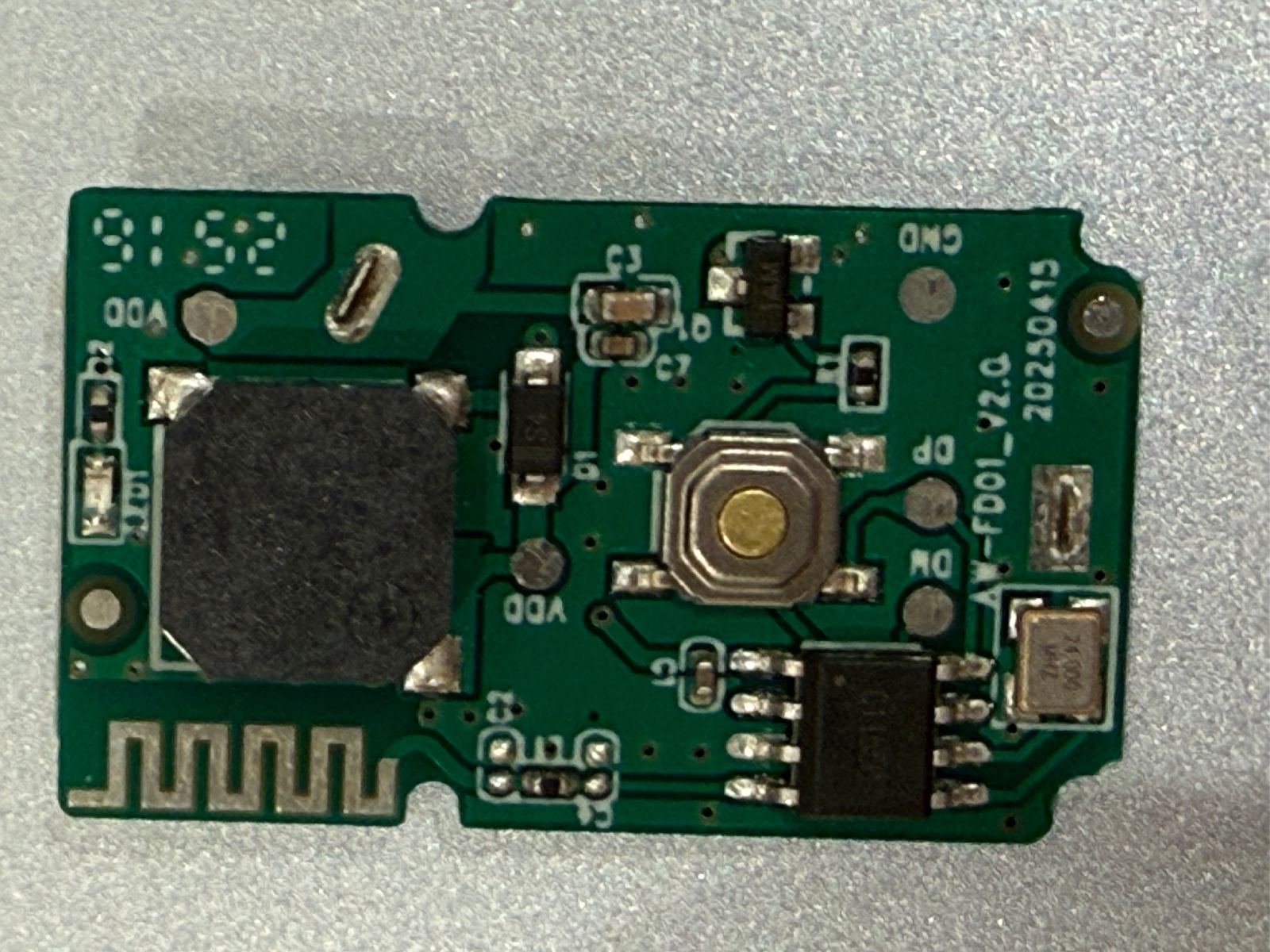
<p align="center">
  <a href="/assets/images/itag-pcb.jpg">
    <img src="/assets/images/itag-pcb.jpg" alt="The iTAG PCB" width="500" />
  </a>
</p>

<p>The PCB is extremely simple. Unfortunately, the main Bluetooth controller uses chip-on-board construction: the silicon is hidden beneath black epoxy, leaving no conventional chip marking to identify.</p>

<p>There are test pads labelled <code class="language-plaintext highlighter-rouge">DP</code>, <code class="language-plaintext highlighter-rouge">DM</code>, <code class="language-plaintext highlighter-rouge">VDD</code> and <code class="language-plaintext highlighter-rouge">GND</code>. I don’t yet know whether <code class="language-plaintext highlighter-rouge">DP</code> and <code class="language-plaintext highlighter-rouge">DM</code> are USB, a programming interface or something else.</p>

<p>I don’t currently have the hardware needed to probe them or attempt a firmware dump, so I took another route: decompiling iSearching.</p>

<h2 id="decompiling-isearching">Decompiling iSearching</h2>

<p>The Android app can be opened in JADX, allowing its BLE implementation to be searched for the UUIDs exposed by the tracker.</p>

<h3 id="starting-with-an-older-version">Starting with an older version</h3>

<p>I started with iSearching 1.3.2. Searching for <code class="language-plaintext highlighter-rouge">FFE0</code> quickly found:</p>

<div class="language-java highlighter-rouge"><div class="highlight"><pre class="highlight"><code><span class="kd">public</span> <span class="kd">static</span> <span class="nc">String</span> <span class="n">c</span> <span class="o">=</span> <span class="s">"0000ffe0-0000-1000-8000-00805f9b34fb"</span><span class="o">;</span>
<span class="kd">public</span> <span class="kd">static</span> <span class="nc">String</span> <span class="n">d</span> <span class="o">=</span> <span class="s">"0000ffe1-0000-1000-8000-00805f9b34fb"</span><span class="o">;</span>
<span class="kd">public</span> <span class="kd">static</span> <span class="nc">String</span> <span class="n">e</span> <span class="o">=</span> <span class="s">"00001802-0000-1000-8000-00805f9b34fb"</span><span class="o">;</span>
<span class="kd">public</span> <span class="kd">static</span> <span class="nc">String</span> <span class="n">f</span> <span class="o">=</span> <span class="s">"00001803-0000-1000-8000-00805f9b34fb"</span><span class="o">;</span>
<span class="kd">public</span> <span class="kd">static</span> <span class="nc">String</span> <span class="n">g</span> <span class="o">=</span> <span class="s">"00002a06-0000-1000-8000-00805f9b34fb"</span><span class="o">;</span>
</code></pre></div></div>

<p>The app enables notifications on <code class="language-plaintext highlighter-rouge">FFE1</code>, and its notification handler recognises two values:</p>

<div class="language-text highlighter-rouge"><div class="highlight"><pre class="highlight"><code>01
A1
</code></pre></div></div>

<p>For <code class="language-plaintext highlighter-rouge">01</code>, it waits 500 ms for another event to distinguish a single click from a double click. In camera mode, it takes a photo immediately.</p>

<p>The old app also writes <code class="language-plaintext highlighter-rouge">00</code>, <code class="language-plaintext highlighter-rouge">01</code> or <code class="language-plaintext highlighter-rouge">02</code> directly to <code class="language-plaintext highlighter-rouge">1802/2A06</code> to control the alarm, matching my experiments.</p>

<p>Useful confirmation, but it didn’t explain the unidentified proprietary characteristics.</p>

<p>The current version did.</p>

<h3 id="multiple-generations-of-itag">Multiple generations of iTAG</h3>

<p>The current iSearching BLE implementation lives under:</p>

<div class="language-text highlighter-rouge"><div class="highlight"><pre class="highlight"><code>com.zoqin.iSearchingPro.ble
</code></pre></div></div>

<p>Its <code class="language-plaintext highlighter-rouge">BleCodeToDataUtil</code> class contains:</p>

<div class="language-java highlighter-rouge"><div class="highlight"><pre class="highlight"><code><span class="kd">public</span> <span class="kd">static</span> <span class="kd">final</span> <span class="kt">int</span> <span class="no">DEVICE_TYPE_ITAG</span> <span class="o">=</span> <span class="mi">1</span><span class="o">;</span>
<span class="kd">public</span> <span class="kd">static</span> <span class="kd">final</span> <span class="kt">int</span> <span class="no">DEVICE_TYPE_MYTAG</span> <span class="o">=</span> <span class="mi">2</span><span class="o">;</span>
<span class="kd">public</span> <span class="kd">static</span> <span class="kd">final</span> <span class="kt">int</span> <span class="no">DEVICE_TYPE_OLD_ITAG</span> <span class="o">=</span> <span class="mi">0</span><span class="o">;</span>
</code></pre></div></div>

<p>So iSearching doesn’t have one universal iTAG protocol. It supports multiple generations.</p>

<p>The old-iTAG profile maps its operations to these characteristics:</p>

<table>
  <thead>
    <tr>
      <th>Purpose</th>
      <th>Service</th>
      <th>Characteristic</th>
    </tr>
  </thead>
  <tbody>
    <tr>
      <td>Notifications</td>
      <td><code class="language-plaintext highlighter-rouge">FFE0</code></td>
      <td><code class="language-plaintext highlighter-rouge">FFE1</code></td>
    </tr>
    <tr>
      <td>Alarm commands</td>
      <td><code class="language-plaintext highlighter-rouge">1802</code></td>
      <td><code class="language-plaintext highlighter-rouge">2A06</code></td>
    </tr>
    <tr>
      <td>Configuration</td>
      <td><code class="language-plaintext highlighter-rouge">FFE0</code></td>
      <td><code class="language-plaintext highlighter-rouge">FFE2</code></td>
    </tr>
  </tbody>
</table>

<p>That finally gives <code class="language-plaintext highlighter-rouge">FFE2</code> a purpose.</p>

<p>The application’s protocol table contains:</p>

<div class="language-java highlighter-rouge"><div class="highlight"><pre class="highlight"><code><span class="kd">public</span> <span class="kd">static</span> <span class="kd">final</span> <span class="nc">String</span><span class="o">[]</span> <span class="no">BLE_SEND_DISCONNECT_ALARM</span> <span class="o">=</span> <span class="o">{</span>
    <span class="s">"555501"</span><span class="o">,</span>
    <span class="s">"5A510301"</span><span class="o">,</span>
    <span class="s">"01"</span>
<span class="o">};</span>

<span class="kd">public</span> <span class="kd">static</span> <span class="kd">final</span> <span class="nc">String</span><span class="o">[]</span> <span class="no">BLE_SEND_DISCONNECT_NOT_ALARM</span> <span class="o">=</span> <span class="o">{</span>
    <span class="s">"555500"</span><span class="o">,</span>
    <span class="s">"5A510300"</span><span class="o">,</span>
    <span class="s">"00"</span>
<span class="o">};</span>
</code></pre></div></div>

<p>The old-iTAG profile selects index <code class="language-plaintext highlighter-rouge">2</code>:</p>

<div class="language-text highlighter-rouge"><div class="highlight"><pre class="highlight"><code>FFE0 / FFE2

01 = enable disconnection alarm
00 = disable disconnection alarm
</code></pre></div></div>

<p>This also explains something odd from my earlier experiments.</p>

<p>Although the tracker exposes the standard Link Loss characteristic at <code class="language-plaintext highlighter-rouge">1803/2A06</code>, current iSearching doesn’t use it to configure the old iTAG’s disconnection alarm. It writes to <code class="language-plaintext highlighter-rouge">FFE2</code> instead.</p>

<p>So the mysterious initial <code class="language-plaintext highlighter-rouge">3C</code> value in <code class="language-plaintext highlighter-rouge">1803/2A06</code> appears to be a separate firmware quirk.</p>

<h3 id="a-newer-protocol">A newer protocol</h3>

<p><code class="language-plaintext highlighter-rouge">DEVICE_TYPE_ITAG</code> and <code class="language-plaintext highlighter-rouge">DEVICE_TYPE_MYTAG</code> use a newer protocol. <code class="language-plaintext highlighter-rouge">FFE1</code> becomes the command/configuration characteristic and <code class="language-plaintext highlighter-rouge">FFE2</code> becomes the notification characteristic.</p>

<p>Most packets begin with <code class="language-plaintext highlighter-rouge">5A 51</code>:</p>

<table>
  <thead>
    <tr>
      <th>Direction</th>
      <th>Packet</th>
      <th>Meaning</th>
    </tr>
  </thead>
  <tbody>
    <tr>
      <td>Phone → tracker</td>
      <td><code class="language-plaintext highlighter-rouge">5A 51 02 01</code></td>
      <td>Start/check alarm</td>
    </tr>
    <tr>
      <td>Phone → tracker</td>
      <td><code class="language-plaintext highlighter-rouge">5A 51 02 00</code></td>
      <td>Cancel alarm</td>
    </tr>
    <tr>
      <td>Phone → tracker</td>
      <td><code class="language-plaintext highlighter-rouge">5A 51 03 01</code></td>
      <td>Disconnect alarm on</td>
    </tr>
    <tr>
      <td>Phone → tracker</td>
      <td><code class="language-plaintext highlighter-rouge">5A 51 03 00</code></td>
      <td>Disconnect alarm off</td>
    </tr>
    <tr>
      <td>Phone → tracker</td>
      <td><code class="language-plaintext highlighter-rouge">5A 51 01</code></td>
      <td>Request battery</td>
    </tr>
    <tr>
      <td>Tracker → phone</td>
      <td><code class="language-plaintext highlighter-rouge">5A 51 04 01</code></td>
      <td>Button/check event</td>
    </tr>
    <tr>
      <td>Tracker → phone</td>
      <td><code class="language-plaintext highlighter-rouge">5A 51 04 02</code></td>
      <td>Double-click event</td>
    </tr>
    <tr>
      <td>Tracker → phone</td>
      <td><code class="language-plaintext highlighter-rouge">5A 51 04 03</code></td>
      <td>Automatic alarm stop</td>
    </tr>
    <tr>
      <td>Tracker → phone</td>
      <td><code class="language-plaintext highlighter-rouge">5A 51 01 ...</code></td>
      <td>Battery response</td>
    </tr>
  </tbody>
</table>

<p>The generic protocol class also contains commands for a Hall alarm and connection verification, but neither iTAG profile actually assigns those fields. Their presence isn’t evidence that the Tesco tracker supports them.</p>

<h3 id="which-protocol-does-my-itag-use">Which protocol does my iTAG use?</h3>

<p>This was the interesting part.</p>

<p>During BLE scanning, iSearching extracts the Manufacturer Specific Data (<code class="language-plaintext highlighter-rouge">0xFF</code>) from each advertisement and passes it to a method wonderfully named:</p>

<div class="language-text highlighter-rouge"><div class="highlight"><pre class="highlight"><code>Warehousing()
</code></pre></div></div>

<p>For devices named <code class="language-plaintext highlighter-rouge">iTAG</code>, it performs this check:</p>

<div class="language-java highlighter-rouge"><div class="highlight"><pre class="highlight"><code><span class="n">i</span> <span class="o">=</span> <span class="o">(</span>
    <span class="n">bArr</span><span class="o">.</span><span class="na">length</span> <span class="o">!=</span> <span class="mi">0</span> <span class="o">&amp;&amp;</span>
    <span class="o">(</span><span class="n">bArr</span><span class="o">[</span><span class="mi">4</span><span class="o">]</span> <span class="o">^</span> <span class="mi">18</span><span class="o">)</span> <span class="o">==</span> <span class="n">bArr</span><span class="o">[</span><span class="mi">9</span><span class="o">]</span> <span class="o">&amp;&amp;</span>
    <span class="o">(</span><span class="n">bArr</span><span class="o">[</span><span class="mi">5</span><span class="o">]</span> <span class="o">^</span> <span class="mi">18</span><span class="o">)</span> <span class="o">==</span> <span class="n">bArr</span><span class="o">[</span><span class="mi">10</span><span class="o">]</span>
<span class="o">)</span> <span class="o">?</span> <span class="mi">1</span> <span class="o">:</span> <span class="mi">0</span><span class="o">;</span>
</code></pre></div></div>

<p><code class="language-plaintext highlighter-rouge">18</code> decimal is <code class="language-plaintext highlighter-rouge">0x12</code>, so:</p>

<div class="language-text highlighter-rouge"><div class="highlight"><pre class="highlight"><code>manufacturer[9]  == manufacturer[4] XOR 0x12
manufacturer[10] == manufacturer[5] XOR 0x12
</code></pre></div></div>

<p>If both comparisons succeed, the tracker is type <code class="language-plaintext highlighter-rouge">1</code>, using the newer protocol. Otherwise it’s type <code class="language-plaintext highlighter-rouge">0</code>, <code class="language-plaintext highlighter-rouge">DEVICE_TYPE_OLD_ITAG</code>.</p>

<p>Remember the Tesco tracker’s manufacturer data?</p>

<div class="language-text highlighter-rouge"><div class="highlight"><pre class="highlight"><code>4F 0F 02 54 53 48 66 02 01 03 00
</code></pre></div></div>

<p>The relevant bytes are:</p>

<div class="language-text highlighter-rouge"><div class="highlight"><pre class="highlight"><code>manufacturer[4]  = 53
manufacturer[5]  = 48
manufacturer[9]  = 03
manufacturer[10] = 00
</code></pre></div></div>

<p>Now apply the XOR:</p>

<div class="language-text highlighter-rouge"><div class="highlight"><pre class="highlight"><code>53 XOR 12 = 41
48 XOR 12 = 5A
</code></pre></div></div>

<p>Neither matches:</p>

<div class="language-text highlighter-rouge"><div class="highlight"><pre class="highlight"><code>41 != 03
5A != 00
</code></pre></div></div>

<p>So current iSearching identifies the £3.50 Tesco tracker as:</p>

<div class="language-text highlighter-rouge"><div class="highlight"><pre class="highlight"><code>DEVICE_TYPE_OLD_ITAG = 0
</code></pre></div></div>

<h3 id="the-tesco-itag-protocol">The Tesco iTAG protocol</h3>

<p>We can now reconstruct the part of the protocol that current iSearching actually uses:</p>

<div class="language-text highlighter-rouge"><div class="highlight"><pre class="highlight"><code>FFE0 / FFE1
  Notify
  01 = button/check event

FFE0 / FFE2
  Write
  00 = disconnection alarm disabled
  01 = disconnection alarm enabled

1802 / 2A06
  Write
  00 = stop alarm
  02 = start/check alarm
</code></pre></div></div>

<p>The physical tracker exposes considerably more than this, including Battery, Tx Power, Link Loss, <code class="language-plaintext highlighter-rouge">FFE3</code> through <code class="language-plaintext highlighter-rouge">FFE7</code>, <code class="language-plaintext highlighter-rouge">FF01</code> and <code class="language-plaintext highlighter-rouge">AE00</code>.</p>

<p>That’s an important distinction: decompiling iSearching tells us what iSearching uses, not necessarily everything the firmware can do.</p>

<p>Still, several independent pieces of evidence now agree. The alarm commands from the APK work on the physical tracker. <code class="language-plaintext highlighter-rouge">FFE1</code> matches its button events. <code class="language-plaintext highlighter-rouge">FFE2</code>, previously unidentified, controls iSearching’s disconnection-alarm setting. And the advertising data captured over the air goes through the exact classification algorithm that selects this protocol.</p>

<p>At this point, the protocol isn’t much of a black box anymore.</p>

<p>Which raises a more entertaining possibility.</p>

<p>Instead of writing software that talks to an iTAG, there is now enough information to write software that pretends to be one.</p>

<p>An emulator would only need to reproduce the advertising data and the small GATT server expected by iSearching. Incoming writes could be logged instead of activating a buzzer, while a virtual button could send the same <code class="language-plaintext highlighter-rouge">FFE1</code> notification as the physical tracker.</p>

<p>If iSearching connects to it and behaves as though it were the £3.50 Tesco tracker, that would be a rather nice final test of the protocol recovered from the app.</p>

<p>That’s probably what I’m going to try next.</p>

<p>And, somehow, after all of this, the real tracker still works.</p>]]></content><author><name></name></author><summary type="html"><![CDATA[I bought a £3.50 Bluetooth tracker from Tesco. Naturally, I started reverse-engineering it.]]></summary><media:thumbnail xmlns:media="http://search.yahoo.com/mrss/" url="https://lev.cx/assets/images/itag-pcb.jpg" /><media:content medium="image" url="https://lev.cx/assets/images/itag-pcb.jpg" xmlns:media="http://search.yahoo.com/mrss/" /></entry><entry><title type="html">Hello, world!</title><link href="https://lev.cx/2026/08/23/hello-world" rel="alternate" type="text/html" title="Hello, world!" /><published>2026-08-23T00:00:00+00:00</published><updated>2026-08-23T00:00:00+00:00</updated><id>https://lev.cx/2026/08/23/hello-world</id><content type="html" xml:base="https://lev.cx/2026/08/23/hello-world"><![CDATA[<p>This is a sample post to test the styling of my blog.</p>

<h2 id="text-formatting">Text formatting</h2>

<p>This is <strong>bold text</strong>.</p>

<p>This is <em>italic text</em>.</p>

<p>This is <code class="language-plaintext highlighter-rouge">inline code</code>.</p>

<p>This is a <a href="https://example.com">link to example.com</a>.</p>

<h2 id="lists">Lists</h2>

<h3 id="unordered">Unordered</h3>

<ul>
  <li>First item</li>
  <li>Second item</li>
  <li>Third item</li>
</ul>

<h3 id="ordered">Ordered</h3>

<ol>
  <li>Step one</li>
  <li>Step two</li>
  <li>Step three</li>
</ol>

<h2 id="code-block">Code block</h2>

<div class="language-javascript highlighter-rouge"><div class="highlight"><pre class="highlight"><code><span class="kd">function</span> <span class="nx">hello</span><span class="p">()</span> <span class="p">{</span>
  <span class="nx">console</span><span class="p">.</span><span class="nx">log</span><span class="p">(</span><span class="dl">"</span><span class="s2">Hello, world!</span><span class="dl">"</span><span class="p">);</span>
<span class="p">}</span>

<span class="nx">hello</span><span class="p">();</span>
</code></pre></div></div>

<h2 id="inline-code">Inline code</h2>

<p>To serve the page, run <code class="language-plaintext highlighter-rouge">jekyll serve</code>.</p>

<h2 id="quote">Quote</h2>

<blockquote>
  <p>Good software is built one small improvement at a time.</p>
</blockquote>

<h2 id="table">Table</h2>

<table>
  <thead>
    <tr>
      <th>Feature</th>
      <th>Status</th>
    </tr>
  </thead>
  <tbody>
    <tr>
      <td>Markdown</td>
      <td>✅</td>
    </tr>
    <tr>
      <td>Dark mode</td>
      <td>🟡</td>
    </tr>
    <tr>
      <td>Custom theme</td>
      <td>🚧</td>
    </tr>
  </tbody>
</table>

<h2 id="final-thoughts">Final thoughts</h2>

<p>This is the end of the test post.</p>]]></content><author><name></name></author><summary type="html"><![CDATA[A sample post to test typography, code blocks, and styling.]]></summary></entry></feed>